
Installing Playback Pilot on Mac
Setup is straightforward: download, drag to Applications, launch. Takes about a minute.
Step 1: Download
Download the app from the link provided, or from playbackpilot.com/download-link. You'll get a .dmg file in your Downloads folder.
Step 2: Open the Disk Image
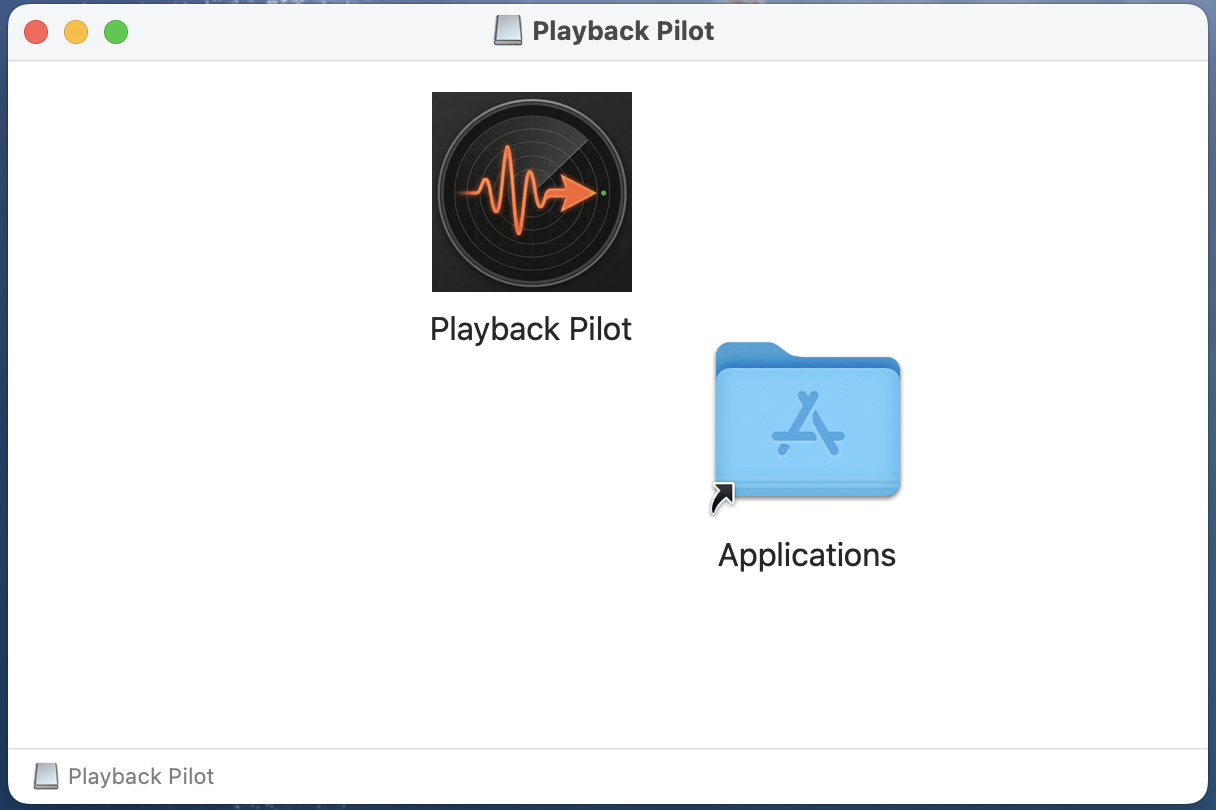
Double-click the downloaded .dmg file. macOS will mount it and open a Finder window showing the Playback Pilot app next to a shortcut to your Applications folder.
→ Double-click PlaybackPilot-X.X.X-mac.dmg
→ A window opens showing Playback Pilot and an Applications shortcut
Step 3: Drag to Applications
In the open disk image window, drag the Playback Pilot icon onto the Applications shortcut. macOS copies the app into your Applications folder.
When the copy finishes, you can eject the disk image: drag it from your desktop to the Trash, or click the eject icon next to its name in the Finder sidebar.
Step 4: Launch & Get Started
Open Playback Pilot from the Applications folder, Spotlight (⌘ + Space, type "Playback Pilot"), Launchpad, or the Dock. On first launch, select a folder with your music projects to scan and get started.
Uninstalling
Drag Playback Pilot.app from the Applications folder to the Trash, then empty the Trash. App data lives in ~/Library/Application Support/Playback Pilot if you want to clean that up too.
Questions or issues? Email hello@playbackpilot.com
Download for Mac